Android, Apple, BUSINESS, Computers, CONS, Eduardo Soliz, Microsoft, Odem, Tablets, TECH, TECH SUPPORT, WHATS GOING ON, WORK, Writing

myPhone

technology2There are a number of things that I don’t mind, but at the same time it’s sometimes fun to wave my metaphorical Cranky Old Man cane at the durn kids with their newfangled doohickeys and double-you-step music.

Case in point: Apple.  I don’t mind them.  I own a 2009 iMac and an original iPad mini.  Both are quite good at what they do, and I continue to use them.  Despite that, I like to thumb my nose at the ‘Apple guy’ in the office (there’s always one) and have back-and-forths with him about why I feel Microsoft is better.  As if in retaliation, my original iPad mini has been slowly inching towards obsolescence with each iOS update.  Recently, I was frustrated at not being able to play the neato new Fallout Shelter game for more than a few minutes without the poor thing crashing.

While the thought of getting a new iPad has crossed my mind, the thought of dropping a few hundred bucks on another one is not a pleasant one, especially since my Windows 8 tablet has proven to be quite capable, Microsoft Office notwithstanding.

Because of its creaky performance, I have been using the iPad mini as a hotspot more than anything else as of late.  I would use my cell phone as a hotspot, but Cricket Wireless has internet sharing disabled on my Lumia 530.  Jerks.  So I send a few bucks to Verizon, turn on the iPad’s hotspot feature, set it down, and then use my Windows laptop or tablet to get things done.

Which brings me to my next point.  I am, for better or for worse, married to Microsoft Windows as well as their ecosystem.  Windows 8.1, Word, OneDrive and OneNote have all served me well over the years and I have no reason to stop using them.

In spite of that, I have decided to get an iPhone for my next phone.  As I am not on a contract, I can make the jump whenever it pleases me, but more practical concerns such as home and vehicle maintenance take precedence. Nevertheless, whenever I am financially ready to make the jump I will be more than happy to for the following reasons:

  1. Apple makes pretty good hardware – My iMac and iPad have been pretty durable and dependable over the years.  I’ll likely have to get a case for an iPhone, but I’m pretty careful with my phones; I’ve never cracked a single screen over the years.
  2. Apps apps everywhere – This is the Achilles’s Heel of Windows Phone; the limited app selection wouldn’t be so bad if Microsoft would keep their own apps up to date.  The iPad version of Word blows the Windows Phone one out of the water, too.
  3. Accessories – Because I often get cheaper (or Windows) phones, cases and accessories are rare or nonexistent.  Stores seem to have three sections for phone accessories: Apple, Samsung, and one with a big sign above it for everyone else that says EFF-YOU.
  4. Microsoft is on board – The fact that I can get Microsoft Word on iOS and Android means no more Brand X Office apps.
  5. Hotspot! – I travel, and it would be nice to be able to fall back on my phone as a hotspot instead having to carry another device to do so.
  6. Android = suck, WinPhone = bleh, iPhone = ? Android devices have been craptacular for me over the years and Windows Phone trips at the finish line despite its nice interface.  I have never owned an iPhone so who’s to say I won’t like it?
  7. Get rid of iPad – I still only have my iPad mini for two reasons: to use as a hotspot and for work.  If I get an iPhone I can do without it completely.
  8. Updates for all! – With Android and Windows Phone, you are at the tender mercies of your carrier for updates unless you buy an unlocked device.  My Windows Phone is one update behind because of this.  iPhones, on the other hand, usually get all updates.

Of course, there is some bad with the good:

  1. Increased Cost – I am currently not on contract with Cricket Wireless and its been pretty sweet: $35 a month for 2.5GB of high speed data and unlimited minutes and texts.  To get an iPhone I’ll either have to pay a few hundred for the device up front or go on a contract again.  Either way that means more money.
  2. Durability – It is out of sheer luck that my Lumia doesn’t have a cracked screen given all the times I’ve dropped it (thank you Nokia).  I will definitely have to get a case to ensure my iPhone doesn’t meet an unfortunate fate.  It will remain to be seen if the iPhone is ‘Eduardo-proof’
  3. Apple EVERYWHERE? – Despite having an iMac and iPad, I am barely invested in Apple’s ecosystem.  Except for backing up my iPad I don’t use iCloud for anything.  That should stay the same with an iPhone…I hope.

I was on the fence about getting iPhone before writing this blog, but now that I’ve jotted down all the ups and downs, I’m all but certain I’m going to pull the trigger on one…eventually.  $35 a month for cell service is going to be really hard to give up, though!

Standard
Apple, BUSINESS, Computers, JUST SAYING, Microsoft, Tablets, TECH, Uncategorized, WORDS, WORK, Writing

A Touch of Office

windowsI purchased a Windows 8 tablet (ASUS VivoTab 8) back in January with the intention of using it as a laptop replacement.  On paper, it sounded perfect:

  • Touchscreen that Windows 8 can work well in
  • Full Windows 8 (none of this RT malarkey)
  • Improved Intel Atom CPU and better battery life compared to a laptop
  • Increased portability
  • Only $150!
  • Free Office 365 for a year

Let’s run down the list:

  • Windows 8 on a touchscreen is pretty good.  Heck, its actually great once you learn all of its little tricks.
  • A full version of Windows 8 means I can install some of my favorite (read: ancient) apps I use like WinAmp 2.9 and Microsoft Money 2000.
  • Remember Netbooks?  Those used the first Intel Atom CPUs and they were dog slow.  The newer one in the VivoTab is good for basic tasks and battery life has been in the 7-8 hour range which is what I wanted.
  • Even with a case, the VivoTab is remarkably portable.  Like my iPad mini, a 7-8″ tablet is the perfect size to carry around.
  • The price was definitely right!

And now we get to the device’s biggest problem:  Microsoft Office.  Because the VivoTab is capable of running the desktop version of Microsoft Office, that’s what you get.  That would be pretty neat, but Office is not optimized for touch on an 8″ screen.  Thus, I end up wasting time mashing its teeny icons with my sausage-fingers and fighting the interface instead of doing work.  Styluses are no help either, they make me feel like I’m trying to draw on the screen with a fuzzing crayon.  I bought a Bluetooth mouse and keyboard so I can get around Office more efficiently, but carrying them around and setting them up sucks some of that wonderful ‘portability’ out of the tablet.

Finally, Office 365 sucks horribly on this device.  It had a terrible habit of slowing down to the point where I could see letters being placed on the screen one…at…a…time every few seconds.  I would type out a full sentence and then wait for the poor thing to catch up before doing the next one because I didn’t want it to crash and potentially lose my work.  I got into the habit of saving very frequently for a few frustrating weeks before removing the craptacular Office 365 and installing my copy of Office 2010.  Needless to say, I have no intention of paying for Office 365 when the trial year runs out.

I really like my VivoTab 8, and if Microsoft could get around to making a version of Office that was suitable for smaller tablets, I would like it a whole lot more.

Oh wait, they already made one…it’s on my iPad mini!  /facepalm

Standard
CREATIVE, Eduardo Soliz, JUST SAYING, WHISKEY-TANGO-FOXTROT, WORDS, WORK, Writing

Unwritten Anger

As I mentioned previously, I tend to carry a chip on writingmy shoulder at work, which can increase or decrease in size depending on the derp that is being thrown my way by customers, coworkers, and the company I work for.  I recently had an instance where working on a story during my lunch hour improved my mood and I felt happy throughout the remainder of the day.
It happened again.  I got worked up into a lather one morning thanks to a coworker who couldn’t follow simple directions.  I reached the point where I had to walk away from my desk because I wanted to hit something or someone.  Lunch couldn’t come too soon because doggone it, I needed a break.

I returned to my desk and lunchtime soon arrived without incident.  I tapped away on my tablet, looking for some mental respite from the day.  I had earbuds on and was listening to music in an attempt to blot out the office noise.  As is often the custom, I opened my ‘To Do’ directory and scrolled down the list of unfinished short stories, blog posts, podcast scripts, and book drafts for something to work on.  I opened up the short story that I had started before.  The words flew from my fingertips and I had a completed first draft by the time lunch was through.  As was the case before, I felt better after the fact.

It then occurred to me that I hadn’t written any fiction in quite a few days; I had been spending them formatting “Fuzzy Words” for publication and recording and editing podcasts.  I started to wonder: was I more easily upset because I hadn’t worked on any stories in a while?  Have I gone from ‘I like to write’ to ‘I need to write?”

Standard
ANIME, CONS, FIRST STORM MANGA, FURRY, JUST SAYING, ORIGINAL-GAMER.COM, RANDOM STOPS, RANDOMIZER9.COM, SAN JAPAN, TECH SUPPORT, WORK

24 Things I Noticed While Helping at San Japan 6

My home for San Japan 6

My home for San Japan 6

I have attended every single San Japan.  I went to the first out of curiosity and found myself helping out with tables for First Storm Manga and original-gamer.com for the next four.  As FSM is no more and I have resigned my post from original-gamer.com, I found myself with nothing to do at San Japan Sinister Six.  I suppose I could have gone as an attendee and enjoyed myself, but instead I decided to help out the fine folks of RegIT with processing the 11,000+ attendees.

  1. You either have fun or work at a convention, and I worked at this one…a LOT
  2. That said, the people I worked with were very cool.
  3. It was neat to experience how much work goes on behind the scenes in registration.
  4. Think about it: about 20 people had to process over 11,000.  That’s pretty nuts.
  5. There were a few glitches, but the overwhelming majority of people were very understanding.  Nerds is good people.
  6. I was right about the customers being cooler at San Japan, there were only had a handful of genuine jerkasses to deal with.
  7. Goof-up #1-Not having good sneakers. I put gel insoles inside my casual shoes, which hepled, but my dogs were barking by the evenings.
  8. Holy cats, some of those cosplayers…Good Lord, I thought blood was going to shoot out of my nose!
  9. I’m old enough to have fathered a teenager, so I guess that makes me a dirty old man now.
  10. A friend guessed my age and was off by a decade, so I guess I’m not doing that bad.
  11. If you are going to give something to someone at a con , be sure you have it on you AT ALL TIMES. Sorry, friend of mine…can I mail you that t-shirt?
  12. Cardboard, if applied correctly, can be pretty awesome, as demonstrated by Tall Cardboard Robot Guy.
  13. I found myself shifting into my ‘announcer voice’ on occasion, that hasn’t happened in awhile.
  14. I don’t think I’ve ever done that at my regular job…which probably says something.
  15. Goof-up #2-Not taking Monday off from work. It would have been nice to do more stuff after the show, but I had to be at work on Monday and do laundry.  Stupid responsibilities!
  16. I wore my Wreck-It Ralph cloth pin and got lots of compliments, which makes me feel bad that I don’t remember the name of the artist who MADE it.  Sorry!
  17. The artists I know seemed to be happier this year and the layout appeared to be MUCH improved this time
  18. That is, the few times I was able to get away and see stuff…see #1
  19. Goof-up #3-Not by me, but for those who would ask me where things were…I AM SORRY BUT I HAVE BEEN HERE THE WHOLE TIME. AND I DON’T KNOW WHERE ANYTHING IS 😦
  20. I think the highlight of the whole thing was when my furiends showed up on Saturday to say hi.  The fuzzies gave me the warm fuzzies.
  21. Which is more than I can say for the jerkass who texted me ‘Are you even here?” despite knowing very well where I was the whole time. YOU KNOW WHO YOU ARE.
  22. Goof-up #4-Not getting a picture of the gal dressed up as the Ancient Aliens guy…she even had a sign that said ‘ALIENS,’ too!
  23. I seem to be doing a lot of apologizing in this list.  Sorry about that!
  24. Now that I can scratch ‘volunteered at a convention’ off my bucket list, I simply have no choice but to have fun at next year’s San Japan Samurai Seven…maybe!
Standard
BUSINESS, JUST SAYING, Microsoft, TECH, TECH SUPPORT, WHATS GOING ON, WHISKEY-TANGO-FOXTROT, WORK

RANDOM REVIEW: Windows 8

EATING MY PEAS

My Windows 8 Desktop

So Purdy…

I first gave Windows 8 a spin when the Developer Preview was released back in 2011.  As I have not purchased a new computer since then, I haven’t had the pleasure of seeing the final product, but judging from prevailing opinion as well as feedback from customers, it seemed that I wasn’t missing much.  As I work in tech support, I figured that I was going to have to support Windows 8 sooner or later, so I decided to eat my peas and installed Windows 8 on my laptop: a 14″ Toshiba P745-S4102 with 6MB of RAM.

THERE AND BACK AGAIN

The install went fairly well, but I made the mistake of not wiping the drive beforehand, so I had lots of icky bits left over from years of Windows 7 use.  I would open up my boot drive to find rouge directories sticking out their tongues at me in glee.  Obviously the thing to do was to delete them, so I got delete happy and of course, deleted an important directory.

So just like I did during my adventures with OS X, I had to start all over again.  I formatted the drive, reinstalled Windows 8, and was back in business.  Windows 8 seemed to be a little more happier after the second install, so lesson learned: always format the hard drive before dropping in a new OS.

THROWN FOR A LEARNING CURVE

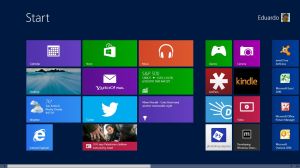
Up until Windows 8 you could count on a few things like the Start Menu and Control Panel to be there.  No mas.  The Start Menu has been replaced by the Start Screen and other options are accessed by pulling up a ‘Charms Bar’ that is accessed by moving the mouse to either the upper or lower-right hand corner of the screen.  Moving the mouse to the lower-left hand corner reveals a shortcut to the Start Menu, and the upper-left corner pulls up the last program opened and a list of currently open programs if you move the pointer down from there.  The interface is not intuitive and poorly explained, you get zero help and are tossed into the Start Screen with nary a tooltip to help you.

A great example of how obtuse things are is the method for shutting down the computer:

  1. Bring up the Charms bar by moving the mouse to one of the right-hand corners…that is, assuming you know its there.
  2. Click ‘Settings’
  3. Click ‘Power’
  4. Click ‘Shut Down’ from the pop up menu.

Is it any wonder that people are upset about having to re-learn how to use their computer again?  Expect to stumble around Windows 8 for a while (I certainly did) until you learn its intricacies or say ‘screw it’ and download a Start Menu replacement.

APPY, APPY, APPY

Mess of tiles on Windows 8 Start Screen

…or not!

One of the big reasons Windows 8 has received so much grief was because of the removal of the apparently-beloved Start Menu.  I admittedly gave them static about this too, but having poked at it again, I now get what it is Microsoft had in mind when they removed it.

Mobile devices like smartphones and tablets have given us the concept of apps, or small programs that only do one thing or access a single service.  Like many of you, I’ve gotten accustomed to doing things via apps.  When done right, they’re great: you open up the app for whatever it is you want to do and take care of business instead of having to open up a browser, navigate to the website, login and all that.

Microsoft and Windows 8 want you to do everything in apps, and while I like this idea and would like to embrace it, the fact of the matter is that for whatever reason, the Windows 8 apps I have used have either fallen short of my expectations or just plain don’t exist.

The official Twitter app is one example.  I have multiple Twitter accounts, randomizer9 is my main one and I have one set up for The Rules of Tech Support.  The Twitter apps on my phone and iPad both allow me to switch back and forth between identities with a few taps, but the Windows 8 app only lets me login to one account, which reduces its usefulness.

Some apps just don’t exist.  The most glaring omissions for me are Facebook and Gmail, though I can set up the Mail client for use with GMail.  I’m also surprised that there isn’t a version of Office that uses the Metro interface.  Granted, I don’t use very many apps to begin with, so its not that big of a deal to me, but other folks who love apps might be disappointed in the selection, though it should get better with time.

THE DOCKING DESKTOP

Luckily, the desktop is still around and is accessed by clicking the Desktop tile.  While the Start Menu is persona non grata, much to the consternation of lots of folks (including myself) programs can be docked to the Taskbar just like in Windows 7.  I found myself docking each one after installing them.  This works pretty well for me and I haven’t really missed the Start Menu all that much, especially since discovering this handy list of Windows key shortcuts.

Unfortunately, installing legacy programs barfs icons all over the Start Screen just like it did before.  It is a little jarring to see the a nice purdy Metro Start Screen morph into icky tile-o-rama with a tap of the Page Down key.  The big problem with the Start Screen is that there is currently no good way to organize tiles that were installed by legacy programs.  Sure, you can move them around, but one of the nice things about Ye Olde Start Menu was that it kept things you didn’t need out of the way.  Hopefully the upcoming Windows 8.1 will resolve some of those issues, otherwise I’m not sure what I’m going to do once my Taskbar fills up with docked programs.

I have experienced no compatibility issues with older programs and hardware as of yet which is pretty darn lucky considering I still use Microsoft Money 2000 and WinAmp 2.9.

WHERE’S MY MEDIA CENTER?

I feel bad for Microsoft at times because even when they do things right they often don’t get credit for it or the Thing Done Right is completely ignored.  Windows Media Center is one of those things.  Media Center turns a TV-tuner equipped PC into a pretty decent PVR and can even stream TV from a PC to an Xbox 360, which is awesome.  It was created during the Windows XP days (remember Media Center PCs? Yeah, me neither) and came included with certain versions of Windows Vista and Windows 7.  It does not come with Windows 8.  If you want Media Center you now have to pay an extra $9.99 even if you have the Super Mega Deluxe Happy Version of Windows..  So much for doing it right.

 CONCLUSION

Despite all the wailing and gnashing of teeth you’ve probably heard, Windows 8 is not that bad.  Yes, it does have some annoying habits, such as the made-for-touch interface and missing Start Menu, but I have learned to live with those inconveniences.  That said, I understand why some people are upset: Windows users (such as myself) have grown accustomed to the Start button/menu being there for nearly twenty years.  For Microsoft to just yank that football away like Lucy does to Charlie Brown is just not right.  I know workarounds, but lots of folks either don’t or don’t want to go through the trouble/hassle.  Microsoft reached just a little too far ahead in that regard.

I understand what Microsoft is trying to do with Windows 8.  I even like the idea of doing everything quickly in apps instead of having to constantly go to the web browser.  Unfortunately, the apps either don’t measure up in terms of functionality or they just aren’t there, which means I end up constantly having to go back to the desktop, which defeats the whole point of the new interface.

The much-touted quick startup and shutdown is nice and my laptop appears to be performing as well as it did before, though, as with any new system, one should be leery of potential conflicts with old hardware and software.  I haven’t hit any snags yet in that department, but time will tell on that.

To wrap up: Windows 8 isn’t quite The Future just yet.  It takes steps in the right direction with its app-centric design but is hamstrung by sub-par apps that will have you going back to the desktop over and over again.  If you are one of these folks that just can’t live without the Start Menu, there are third party add-ons, but I can’t vouch for their usefulness or reliability.  Once you get over the steep learning curve, 8 isn’t all that bad, but it isn’t as great as it could have been, either.  The upcoming Windows 8.1 should make things better so we’ll have to wait and see what happens.  While I’ll be sticking with Windows 8 for the short-term, I won’t be tossing away my Windows 7 install disc anytime soon.

3 out of 5 tiles.

Standard
BUSINESS, JUST SAYING, TECH SUPPORT, WHATS GOING ON, WHISKEY-TANGO-FOXTROT, WORK, Writing

ACHIEVEMENT UNLOCKED: Found Good Mechanic

New (or new to you) cars are great.  The smell, the shiny exterior, the pristine interior and smooth ride make driving a joyous experience.  Of course, all good things come to an end, and years later, the honeymoon is over.  You find that your once noble steed has become a pack mule that smells funny and doesn’t always obey your commands.

Such was the case with my 2005 Dodge Neon.  I purchased it new in 2006 and christened it the “Reliant” during those halcyon days when it was nice and shiny.  Fast-forward almost six years later, and it now has some ‘personality quirks’ such a the stains on the driver’s seat, dent on the back where I punched it one particularly bad day, and yeah, I haven’t been washing it nearly as frequently as I should have been.  It also started running fairly loudly a few months ago, sounding more like a Cessna than a car.  After almost being driven insane by the noise during a drive up to Dallas a few weeks ago, I decided to get the thing fixed and started asking friends and acquaintances if they knew of a good garage in town.  Nobody knew of one, which was more than a little aggravating.

And then I had my little accident…

So I was stuck when the tow truck guy was asked where to send my car to.  I asked the insurance guys for a suggestion and they gave me an address, which I then gave to the tow truck guy.  I then saw my car hauled off to who-knows-where to have who-knows-what done to it.  A week and a half later, I had my car back without a working air conditioner and it was still shaking, so not only was I back to square one, I now needed to have my car looked at before the triple-digit Texas heat kicked in and turned my car into an EZ-Bake oven on wheels.

Luckily my friend Kate finally came around with a recommendation: Alamo Heights Garage.  She spoke highly of them so I figured I’d give them a shot.  I went to their website, and filled out their online form asking for an appointment on Saturday.  I got a response back in a few hours saying that they weren’t open on Saturday.

What is it with mechanics being closed on Saturdays?  Sundays I can understand, but come on, it sucks to have to take time off of work to get my car looked at, and it’s never a short visit.  Anyway, I set up an appointment for the following Tuesday morning, guessing that I would be waiting a half-day while the A/C fixed.  I figured I’d ask them to see just what was making the shaking noise as well.

I arrived at Alamo Heights Garage early Tuesday morning.  I had bought my laptop along so I could work on some writing while I waited.  The first thing I noticed was that the waiting area was very clean, there was a table and chairs where I could sit and work, a television tuned to the local news with some more comfortable seating in front of it and most importantly to me: coffee. 

After describing what was happening to the woman behind the counter, I grabbed a cup of coffee, opened up my lappy and did some work.  I was glad to discover that they had WiFi available.  About a half an hour later, I got the diagnosis: the air conditioner’s discharge hose was bad, and the shaking was caused by three worn engine mounts that would have to be replaced.  The total cost to get  both things fixed was going to be $800: $300 for the A/C and $500 for the mounts.  I figured that since the Reliant had not given me any major problems in the past, I would get the work done and hopefully have a better-running car that I could hold onto longer as well as be easier to sell once that time came.

The work was going to take most of the day, so I was offered a ride to work and was told that I would be contacted once everything was done.  I gratefully accepted the ride and spent the day at work as usual, that is, except for having to hitch a ride to lunch.  As four o’clock arrived, I waited to get a call from the garage letting me know my car was ready.  I started getting nervous, because my job is answering technical support calls, and a bad call could easily last an hour.  Our lines were open beyond the garage’s closing time, so if I got stuck on a long call, I might not be able to leave work in time to get to the garage to pick up my car before they closed.

If that isn’t a setup, I don’t know what is…you can just guess what happened next.

My next call was a customer with a Big Nasty Problem, and of course, five minutes into the call, my cell phone started ringing.  To make matters worse, the customer was dumber than a box of rocks, and I kept looking back and forth at the time while repeatedly trying to tell the customer how to open up a web page. My anxiety only increased as the phone kept ringing about every ten minutes, and I started looking for an opening where I could close out the call.  Luckily, I didn’t have to, either the customer hung up out of frustration or their phone battery died.  Either way, I didn’t care, I immediately called the garage and let them know I was on my way.

I could have been picked up by someone from the garage, but a friend had offered to give me a ride as it was on his way home, so I took him up on it.  I was dropped off, paid the bill, got my keys and hopped into my should-now-be-running-like-new car.  And you know what?  It really feels like a whole new car now, because the guys at Alamo Heights Garage did a great job on it.  The Reliant’s ride was nice and smooth, and the air conditioner worked like a champ.

Did I pay too much for the repairs?  I don’t know enough about cars to know if I did or not.  All I know is that I am happy with the excellent service I received, and the follow up call to see if everything was still work the week after and the 12-month/12,000 mile warranty on the repairs tell me that these guys are going to stand behind their work.

I’d like to thank the folks at Alamo Heights Garage, not only for doing a great job on the repairs to my car, but for making the process as pleasant as it could be.  I didn’t have to take much time off from work, either.  This was easily the best experience I have ever had with a mechanic that I didn’t personally know and I feel more comfortable knowing if my noble steed should ever be in need of repair in the future I know where to take it.

That’s right, almost six years later, the Reliant is my noble steed once again.

Standard
BAKING, Broadband, COOKING, FOOD, JUST SAYING, RANDOMIZER9.COM, WHATS GOING ON, WORK

24 Things I Noticed While Moving for the Umpteenth Time

Well that's just ducky!

What every new home needs!

I turned in the keys to my old apartment today, and so I once again bid farewell to one apartment while getting settled into a new one.

  1. Whily my method of shuttling stuff back and forth with my compact car is horribly inefficient, it gets me plenty of exercise.
  2. Okay, yeah, its ridonkulous and I should just do everything at once next time.
  3. I thought “why is it pink instead of blue?” upon seeing the toilet paper and rubber duckie above and then I saw the Susan G. Komen card and pink ribbon.  Ohhhh.  Derp.
  4. Speaking of which, I always leave a roll of toilet paper in the old place. I’m not sure why, its just something I do.
  5. Sometimes I wonder if I am really this elated at being here, or am I just high from paint fumes?
  6. It only took two trips to move the crap that wouldn’t fit in my car, so yeah, I should have packed everything else up.
  7. Cable guys are much more efficient when you have the apartment folks call them.
  8. That’s a good thing, too, because once again, I’m facing the wrong way to get a satellite.  Rats.
  9. Digital thermostats are awesome.
  10. The new place’s built-in shelves can hold all of my games and movies, and it is BEAUTIFUL!
  11. I have been in such a better mood now that my commute has been cut in half.  God, how I hate traffic, and once those really tall ramps (or skyways as I like to call ’em) on 281/1604 are done, the commute should be smooth sailing.
  12. My commute should be cut about in half, which is good because holy cats, gas is getting expensive!
  13. It really says something when even the dollar store in the new neighborhood is nicer.
  14. The nearest HEB is an older one.  Somehow, this isn’t a problem.
  15. The nearest Wal-Mart got upgraded from a “Raunchy-Mart” to a Supercenter since my last visit.  Nice.
  16. The nearest Best Buy might just be a little too close, I think I need to freeze my credit card…I mean literally, as in ICE.
  17. I should have gotten rid of that old living room furniture a LONG time ago.
  18. Shopping for new furniture has been a drag so far, maybe I should just get a bunch of beanbags, or move my bed into the living room.
  19. Moving stuff while working the 9-6 shift work during the wintertime SUCKS.
  20. Really, it wasn’t until that first Saturday that I went, “Gee, this is what this place looks like during the day.”
  21. The water heater at my old place didn’t hold enough hot water to take a bath, no wonder I was so cranky there.
  22. The oven here isn’t much bigger than the one at my old place, but at least it has A LIGHT! Seriously, the last one felt like an Easy-Bake.
  23. The margin of error on that thing is pretty darn thin, though, one long paragraph or trip to the bathroom and I end up with dark brown instead of golden brown cookies.
  24. My TV looks kind of small now, maybe its time to upgrade! 🙂
Standard
Apple, BUSINESS, JUST SAYING, RANDOMIZER9.COM, TECH, TECH SUPPORT, WHISKEY-TANGO-FOXTROT, WORK

Upgrade or Die!

YOU GET NOTHING! YOU LOSE! GOOD DAY, SIR!

There are many common terms that have different meanings when put into the context of computers.  To most people, “monitor” means to keep an eye on something, but to us IT Guys, its a display device.  “Legacy” is another one of those terms; in the computer world, it is a nice way of saying “obsolete.”  I learned this at a previous support job where the company pushed and pushed for its customers to upgrade (and spend more money on) the Latest and Greatest version of their software, but there were plenty of hangers-on that were content to use older versions.  That’s the way it was, it worked, and they liked it.

Eventually, a new service pack or new version of Windows would come along that would completely break the software, and there wasn’t much else we could tell those guys besides “well, you need to upgrade.”  The customers would get mad and stomp their feet and demand that we fix it right away, but 95% of the time, that wasn’t going to happen.  If the customer didn’t upgrade, they were out of luck.  On a certain level, I can understand the desire to not change something that works (heck, I still use Microsoft Money 2000 and WinAmp 2.9), but at the same time, nearly all computer software will eventually go off into the night of obsolescence because eventually the developer will decide that it isn’t worth the expense of continuing development and support.

One common customer response I would hear (and still do) to this situation was that we were awful people that wanted them to spend more money.  To that, I say: I’m sorry, but this is a BUSINESS, it exists to create a product, provide a service, and make money.  If we don’t make money by releasing new products and lose money by devoting too many resources to old software, we go out of business and all lose our jobs.  Yeah, it royally sucks for users (I myself had a printer that was ‘orphaned’ when Windows Vista came around) but it is a necessary part of the software “circle of life.”

At least that’s how it should work, but instead, many companies insist on continuing to support outdated software, and continue to sell it in many cases.  The end result is that tech support gets driven bonkers trying to support the old stuff on top of all the new stuff that comes out and it can get overwhelming.  It also results in poorer customer service because techs have to take extra customer time to dig into knowledgebases and ask senior techs about programs that were written for Windows 95.

This is one of the few things I love about Apple.  Instead of letting software linger around and stink up the place like old cheese, they have the cojones to tell their customers that the bar is closing, its lights out, so go to the newer nicer bar down the street or go home.  They did it when they nuked support for ‘classic’ Mac applications in Leopard, and again by no longer supporting PowerPC applications in Lion.  In both cases they waited until four years until after the product was discontinued before pulling the plug and did not hesitate to do so.

In the short term, yes, some customers will be upset and some will go to competitors, but in the long-term, the company can continue to move forward as opposed to having the dead weight of zombie software hanging around their necks like an albatross.  I guess we can put this in the “painfully obvious observation that senior management never gets” file.  I can’t wait to see what happens when Windows XP support goes away in 2014…or maybe I can.

Standard
BUSINESS, JUST SAYING, RANDOMIZER9.COM, TECH, WHISKEY-TANGO-FOXTROT, WORK

Microsoft Outlook Sends Its Condolences

Should I send a "thank you" card to the server?

This came with some flowers that were sent to me by the company I work for.  I appreciate the gesture (Lord knows my apartment could use the greenery) but would it have been that hard to put just ONE person’s name on the card??

Standard